Community Forums › Forums › Archived Forums › Design Tips and Tricks › Simple Hook Video
Tagged: Simple Hooks, video
- This topic has 12 replies, 2 voices, and was last updated 11 years, 3 months ago by
e-Partner.
-
AuthorPosts
-
January 21, 2013 at 8:17 am #13462
e-Partner
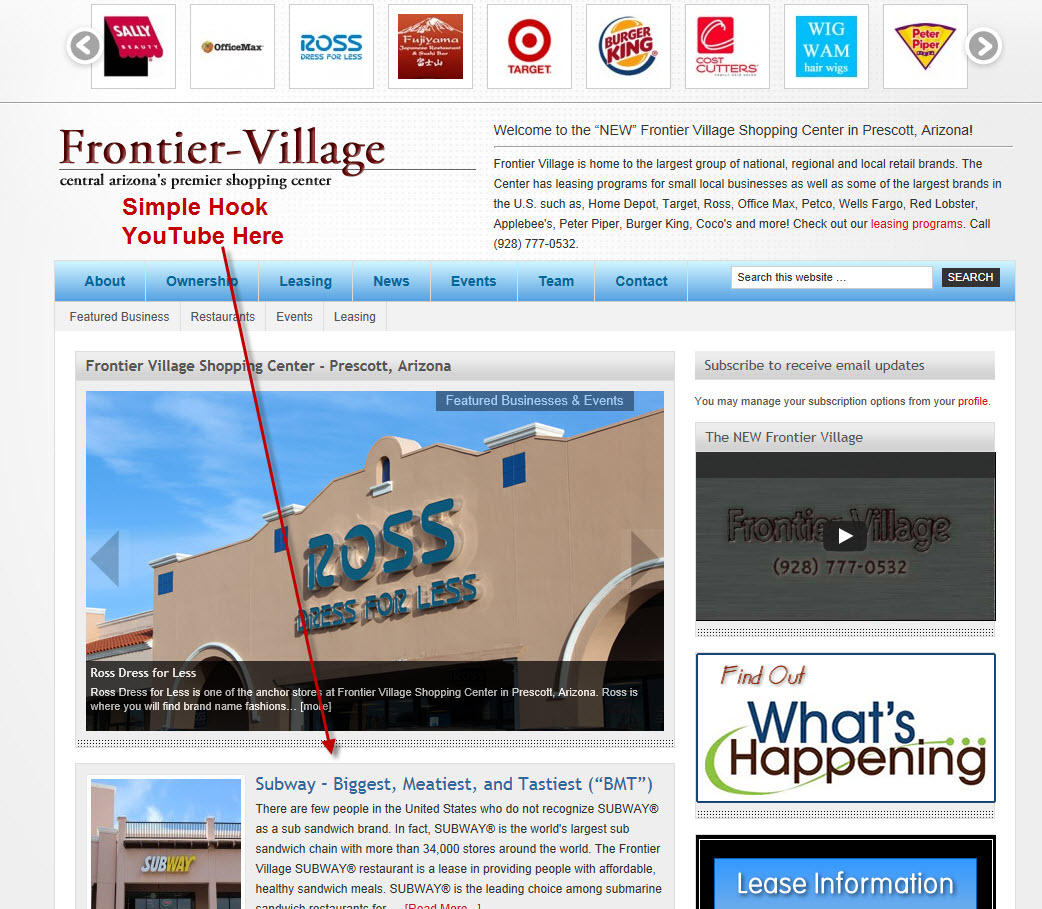
MemberAt http://www.Frontier-Village.com I would like to use Simple Hooks to insert a YouTube video <iframe> on the Index Page just below the slide show and above the posts; the slide show is showing Starbucks, Ross, Target, etc. Is there a way to do this suing Simple Hooks? I cannot seem to get the video into this location. All input requested and deeply appreciated.
This is where I want the video:
http://www.frontier-village.com/wp-content/uploads/2013/01/YouTube-Simple-Hook-Location.jpg
January 21, 2013 at 9:32 am #13473Brad Dalton
ParticipantTry this in the location you want to display the video using Simple Hooks:
You can easily change the conditional tag:
<?php if (is_home() ) { ?>
<div><iframe> youtube video embed code</iframe></div>
<?php } ?>
January 21, 2013 at 9:53 am #13476MemberWhere is that nice solution going to be inserted in the Simple Hooks framework?
January 21, 2013 at 10:24 am #13482ParticipantYou'll need to test it to see where it outputs.
Try here.
genesis_before_content Hook
This hook executes immediately before the content column (outside the #content div).
January 21, 2013 at 10:30 am #13484MemberThanks...although I have tested the locations repeatedly, I'll give the new code a whirl in your suggested location and let you know. 🙂
January 21, 2013 at 10:39 am #13490MemberHere is where the view of the video in the genesis_before_content Hook location. http://www.Frontier-Villge.com.
January 21, 2013 at 10:41 am #13491MemberI have also inserted the code into the genesis_before_content Hook, which logically sends it to the bottom.
January 21, 2013 at 11:03 am #13496ParticipantJanuary 21, 2013 at 11:08 am #13498MemberPlatinum Child Theme running on the Genesis Framework.
January 21, 2013 at 11:10 am #13500MemberJust removed the YouTube <iframe> from the top and you will see I have left it at the bottom until I figure this monster out. I might have to hard core it into the Editor, but don't really like to do that.
January 21, 2013 at 6:12 pm #13607ParticipantWhen i tested this, it worked. You have alot of things going on your homepage. You could use a static page as your homepage and do that yes.
January 23, 2013 at 7:04 am #14035MemberJust so I am clear, when you tested the following in the "genesis_before_content Hook", with the YouTube <iframe> inserted, you found it successful?
<?phpif(is_home() ) { ?>
<div><iframe> youtube video embed code</iframe></div>
<?php } ?>Also are you checking the boxes below the code that reference the pHp and Hook generation?
Thanks!
January 23, 2013 at 7:12 am #14039MemberTried it again and no go...the insertion of the video appears above the Digital Content Gallery slideshow.
Here's my insertion:
<?php if (is_home() ) { ?><div><iframe width="599" height="337" src="http://www.youtube.com/embed/HPrHdngEpRw?rel=0" frameborder="0" allowfullscreen></iframe></div><?php } ?>
Puzzling...
-
AuthorPosts
- The forum ‘Design Tips and Tricks’ is closed to new topics and replies.